Business & Home
Calculate food cost percentage for an item or operating period
Compare food cost with selling price or food sales, derive period food used from inventory, and check the result against an optional target percentage.
Food cost percentage
Actual versus target at the current sales value
| Measure | Actual | Target |
|---|
Calculation breakdown
Gross profit here means sales minus food cost only. It does not subtract labor, packaging, rent, delivery fees, taxes, utilities or other operating expenses.
How the Food Cost Percentage Calculator Works
The Food Cost Percentage Calculator measures food cost as a percentage of the matching selling value.
It supports two different calculations:
- Menu item or serving — calculate food cost percentage from a direct serving cost or recipe batch cost.
- Inventory period — estimate food cost percentage from beginning inventory, purchases, ending inventory, and matching food sales.
The calculator can also compare the result with a target food cost percentage and show the difference in both percentage points and monetary value.
Calculate Food Cost Percentage for a Menu Item
For an individual item or serving:
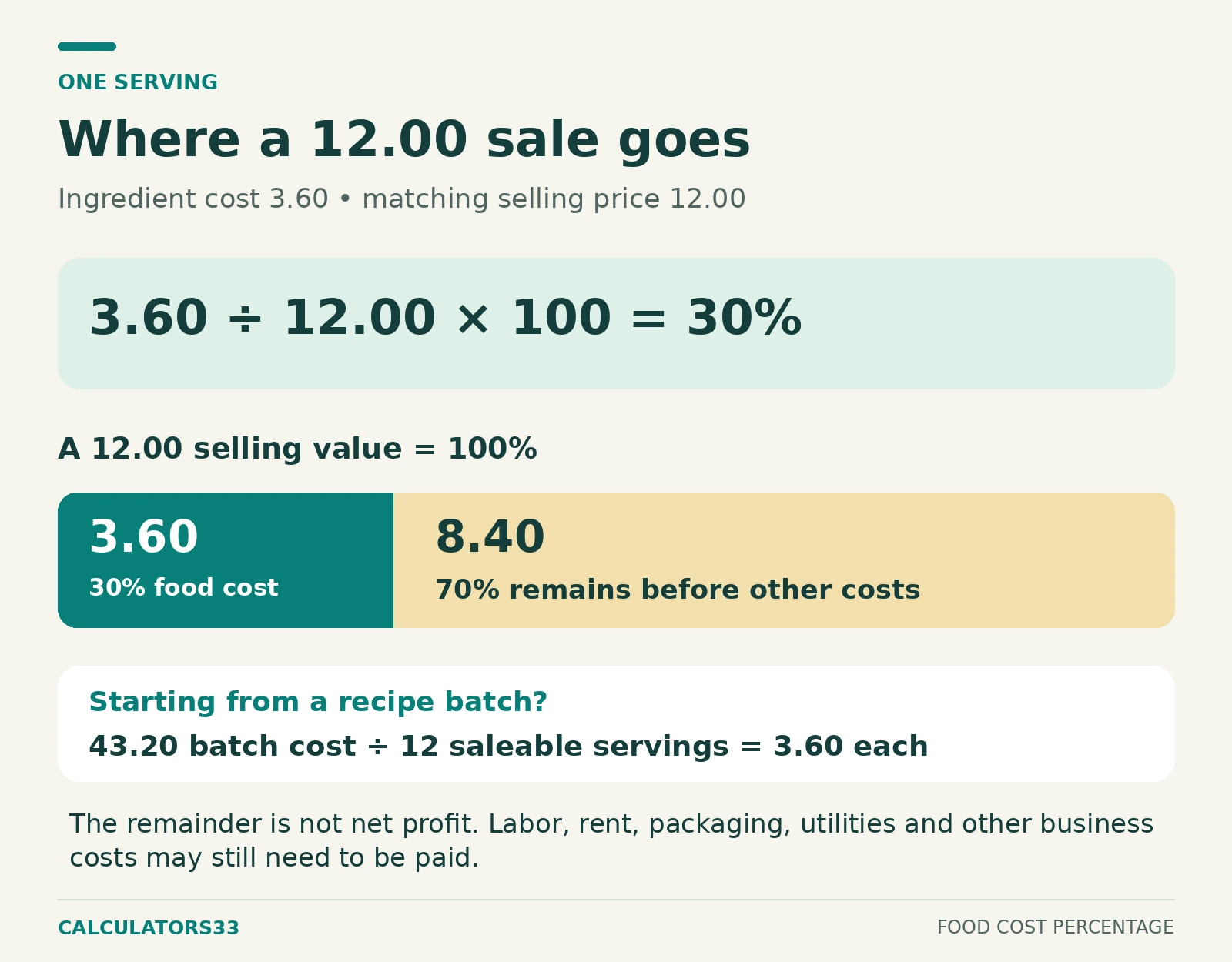
Food cost percentage = Food cost ÷ Selling price × 100
Suppose:
| Input | Value |
|---|---|
| Food cost per serving | $3.60 |
| Selling price per serving | $12.00 |
Apply the formula:
$3.60 ÷ $12.00 × 100 = 30%
Food cost percentage:
30%
The amount remaining after food cost is:
$12.00 − $3.60 = $8.40
Gross margin after the entered food cost is:
$8.40 ÷ $12.00 × 100 = 70%
The complete result is:
| Output | Result |
|---|---|
| Food cost amount | $3.60 |
| Selling price | $12.00 |
| Food cost percentage | 30% |
| Amount remaining after food cost | $8.40 |
| Gross margin after food cost | 70% |
| Food cost per $100 of sales | $30.00 |
| Cost per serving | $3.60 |
The $8.40 remaining after food cost is not net profit. It is simply the portion of the selling price left after subtracting the entered food cost.
Choose Item Mode or Period Food Cost Mode
The two calculation modes measure different scopes.
| Calculation mode | Use it when |
|---|---|
| Menu item or serving | You want the food cost percentage of one item, portion, or serving |
| Inventory and food sales for a period | You want food cost percentage across an operating period using inventory and purchases |
Item mode measures the economics of a specific saleable item.
Period mode estimates food used across the selected accounting period and compares it with corresponding food sales.
The two results should not automatically be expected to match.
Calculate Food Cost From a Recipe Batch
Item mode supports two ways to enter food cost:
- direct cost for one item or serving;
- recipe batch cost divided by saleable yield.
When using a recipe:
Cost per serving = Recipe batch food cost ÷ Recipe yield
Suppose:
| Input | Value |
|---|---|
| Recipe batch food cost | $43.20 |
| Recipe yield | 12 servings |
| Selling price per serving | $12.00 |
Cost per serving:
$43.20 ÷ 12 = $3.60
Then:
$3.60 ÷ $12.00 × 100 = 30%
The result is the same 30% food cost as the direct-cost example because both calculations ultimately use the same $3.60 serving cost.
Keep Food Cost and Selling Price on the Same Basis
The numerator and denominator must describe the same saleable unit.
Correct comparisons include:
- per-serving cost vs per-serving selling price;
- per-item cost vs per-item selling price;
- total period food cost vs corresponding period food sales.
Do not compare a complete recipe batch cost directly with the selling price of one serving.
For example, if:
- Batch cost = $43.20
- Yield = 12 servings
- Selling price = $12 per serving
the correct cost basis is:
$43.20 ÷ 12 = $3.60 per serving
not the full $43.20 batch cost.
Use the Cost of Ingredients Actually Consumed
Recipe batch cost should represent the cost of ingredient quantities used in the recipe.
Opening a package that costs $25 does not automatically make the entire $25 a cost of one recipe if only part of that package is consumed.
Apply one consistent ingredient-costing method across the recipe before calculating the batch total.
Then divide that batch cost by the saleable yield.
Use Practical Saleable Yield
Yield can materially change the calculated cost per serving.
Suppose a recipe costs:
$60
If it produces 20 saleable portions:
$60 ÷ 20 = $3.00 per portion
If 24 portions are entered instead:
$60 ÷ 24 = $2.50 per portion
The second calculation produces a lower cost only because more saleable portions were assumed.
Use the yield that represents the portions the recipe actually produces on the same basis as the selling price.
The calculator does not automatically estimate:
- trimming losses;
- cooking losses;
- waste;
- inconsistent portion sizes.
Those effects should already be reflected in the batch cost or practical yield you enter.
Use the Appropriate Selling Value
The selling-price input should match the transaction being evaluated.
For a standard menu item, use the regular selling price.
If you are analyzing a discounted sale, use the actual selling value relevant to that sale.
Suppose food cost remains:
$3.60
At a $12 selling price:
$3.60 ÷ $12 × 100 = 30%
If the selling value falls to $10:
$3.60 ÷ $10 × 100 = 36%
The cost did not change, but the food cost percentage increased because the selling value decreased.
If sales tax or VAT is collected separately and excluded from revenue in your records, use the corresponding pre-tax or net selling value rather than mixing the cost with a tax-inclusive customer total.
Calculate Food Cost Percentage for an Inventory Period
Period mode estimates food used during an operating period from:
- beginning inventory;
- food purchases;
- ending inventory.
The core calculation is:
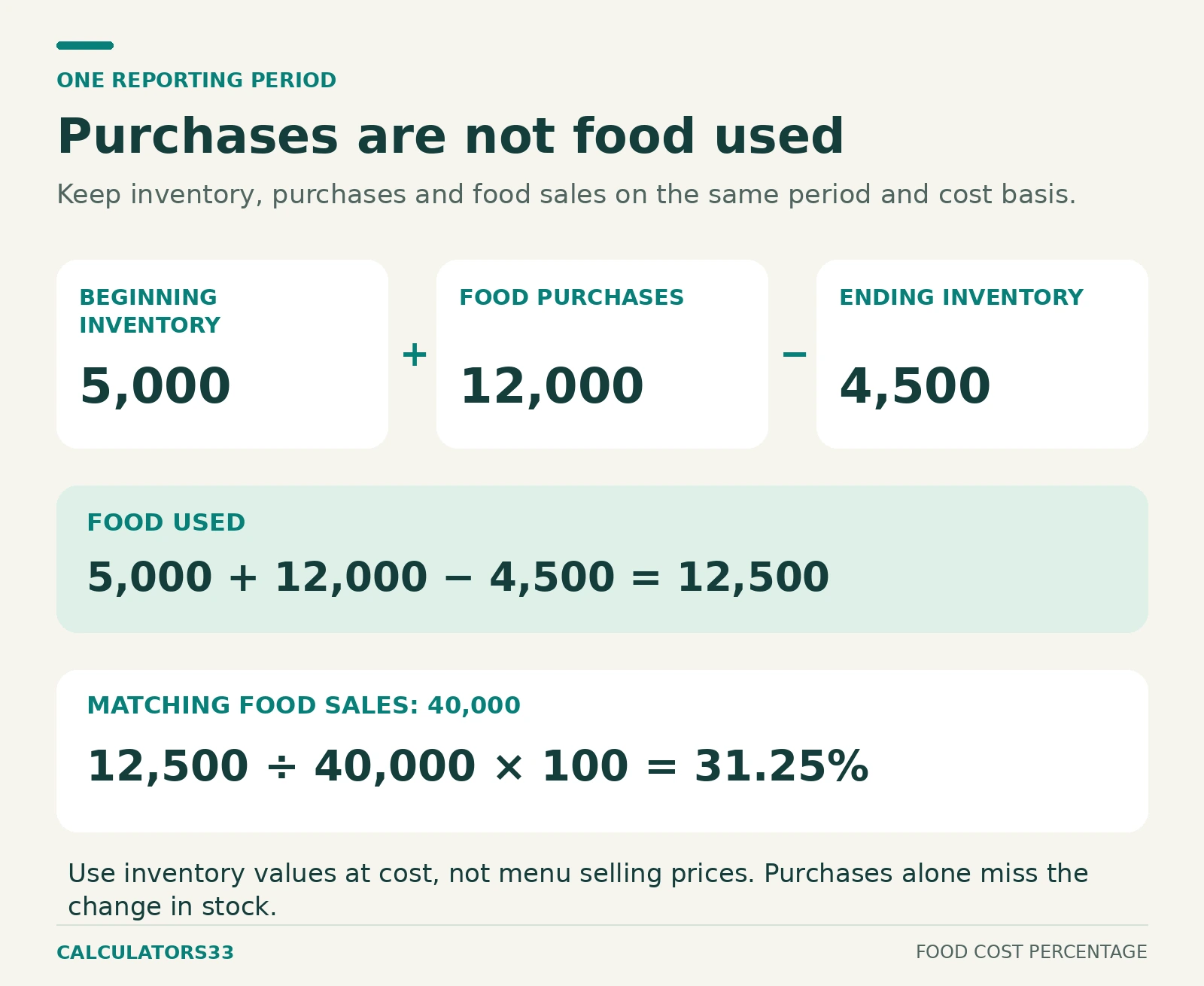
Period food cost = Beginning inventory + Food purchases − Ending inventory
Then:
Period food cost percentage = Period food cost ÷ Food sales × 100
Cornell University’s Inventory Accounting Guidelines document the same basic beginning-inventory-plus-purchases-minus-ending-inventory relationship for calculating cost of goods sold.
Worked Period Example
Suppose:
| Input | Value |
|---|---|
| Beginning food inventory | $5,000 |
| Food purchases | $12,000 |
| Ending food inventory | $4,500 |
| Food sales | $40,000 |
Step 1: Calculate Food Available
$5,000 + $12,000 = $17,000
Step 2: Subtract Ending Inventory
$17,000 − $4,500 = $12,500
Period food cost:
$12,500
Step 3: Calculate Food Cost Percentage
$12,500 ÷ $40,000 × 100 = 31.25%
Step 4: Calculate the Amount Remaining After Food Cost
$40,000 − $12,500 = $27,500
Gross margin after food cost:
100% − 31.25% = 68.75%
The complete result is:
| Output | Result |
|---|---|
| Period food cost | $12,500 |
| Food sales | $40,000 |
| Food cost percentage | 31.25% |
| Amount remaining after food cost | $27,500 |
| Gross margin after food cost | 68.75% |
| Food cost per $100 of sales | $31.25 |
Keep All Period Inputs in the Same Accounting Period
Beginning inventory, purchases, ending inventory, and sales must describe the same time period.
For a monthly calculation, use:
- beginning inventory for that month;
- purchases belonging to that month;
- ending inventory for that month;
- food sales for that same month.
Do not combine weekly inventory movement with monthly sales.
A mismatch in periods makes the resulting percentage difficult to interpret even if each individual input is accurate.
Match the Food Cost Scope With the Sales Scope
The sales denominator should correspond to the inventory and purchases being measured.
If the inventory figures include food only, compare them with corresponding food sales.
Do not automatically divide food-only costs by total business revenue containing unrelated categories such as:
- alcoholic beverages;
- merchandise;
- services;
- other non-food sales.
The calculation should compare matching scopes:
Food cost ÷ Food sales
rather than:
Food cost ÷ unrelated total revenue
unless those categories are intentionally part of the same accounting calculation.
Enter Adjusted Period Values When Required
Real operating records can contain adjustments such as:
- supplier credits or returns;
- inventory transfers;
- employee meals;
- complimentary food;
- spoilage or waste;
- inventory corrections;
- invoices recorded in another period.
The calculator does not have individual adjustment fields for each of these situations.
When your accounting method requires an adjustment, first determine the appropriate net inventory, purchase, or food-cost value, then enter that adjusted amount.
For example, if supplier credits have already been deducted from the purchase figure, enter that net purchase amount.
Do not subtract the same credits a second time.
Ending Inventory Cannot Exceed Food Available
Food available before ending inventory is deducted is:
Food available = Beginning inventory + Purchases
The calculator therefore requires:
Beginning inventory + Purchases − Ending inventory ≥ 0
Suppose:
- Beginning inventory = $4,000
- Purchases = $2,000
- Ending inventory = $7,000
Then:
$4,000 + $2,000 − $7,000 = −$1,000
A negative period food cost indicates that the entered inventory and purchase figures should be reviewed.
The calculator rejects this state instead of presenting a negative food-cost percentage as an ordinary result.
A zero period food cost is mathematically possible, but it is unusual enough that the source records should be checked.
Compare Actual Food Cost With a Target
The optional target does not change the actual food-cost calculation.
It compares the calculated percentage with a selected benchmark.
The variance is:
Variance from target = Actual food cost percentage − Target food cost percentage
Interpret the sign as:
- Positive variance — actual food cost is above target;
- Zero variance — actual food cost matches target;
- Negative variance — actual food cost is below target.
Example: 31.25% Actual vs 30% Target
Actual food cost:
31.25%
Target:
30%
Variance:
31.25% − 30% = 1.25 percentage points
The actual result is therefore:
1.25 percentage points above target
This is a percentage-point difference, not a 1.25% relative increase.
Convert a Food Cost Target Into a Dollar Amount
The target percentage can also be converted into the food-cost amount corresponding to the current selling value.
Use:
Target food-cost amount = Matching sales value × Target percentage ÷ 100
The matching sales value means:
- selling price in item mode;
- food sales in period mode.
Using:
- Food sales = $40,000
- Target food cost = 30%
Target food-cost amount:
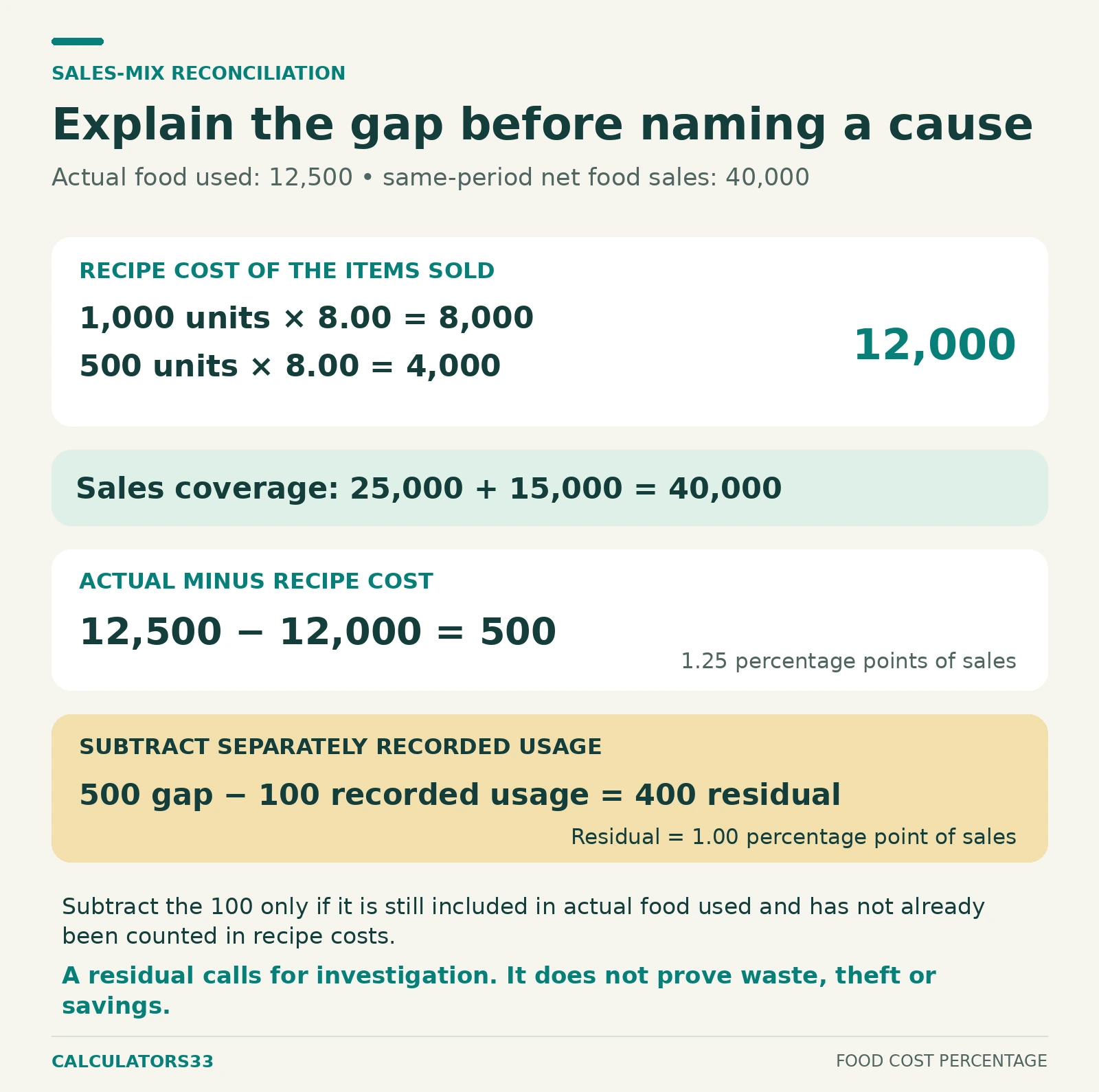
$40,000 × 30 ÷ 100 = $12,000
Actual food cost:
$12,500
Dollar variance:
$12,500 − $12,000 = $500
Comparison:
| Measure | Actual | Target |
|---|---|---|
| Food cost percentage | 31.25% | 30% |
| Food cost amount | $12,500 | $12,000 |
| Gross margin after food cost | 68.75% | 70% |
At the current sales level, actual food cost is:
$500 above the amount corresponding to the selected 30% target
The comparison keeps the current selling price or sales value fixed.
It does not calculate a new selling price.
If the goal is to determine what menu price corresponds to a target food cost percentage, gross margin, or markup, use the Menu Price Calculator.
Understand Display Precision
The calculator performs calculations from the entered numeric values before formatting the result for display.
Suppose actual food cost differs slightly from the target, but the calculator is set to show only one decimal place.
Two different underlying values could both display as:
30.0%
That does not necessarily mean they are mathematically identical.
Display precision controls presentation.
It does not change the underlying cost, sales, or target values.
A true exact target match should therefore be distinguished from a small non-zero variance that only appears equal after display rounding.
Understand Gross Margin After Food Cost
For the same cost basis:
Gross margin after food cost = 100% − Food cost percentage
If food cost is:
30%
the portion of sales remaining after food cost is:
70%
This does not mean the operation has a 70% net profit margin.
Other costs may still need to be paid from that amount.
These can include:
- labor;
- occupancy;
- utilities;
- packaging;
- delivery expenses;
- payment-processing fees;
- insurance;
- other operating costs.
The calculator measures food cost and the amount remaining after that entered cost only.
Understand Food Cost per $100 of Sales
Food cost percentage can also be expressed as cost per 100 units of matching sales.
For example:
31.25% food cost
means:
31.25 units of food cost for every 100 units of matching sales
With USD selected, this can be displayed as:
$31.25 of food cost per $100 of sales
This is not a different costing formula.
It is another way to express the same 31.25% relationship.
Currency Selection Does Not Convert Money
The currency selector controls the monetary label displayed by the calculator.
It does not perform foreign-exchange conversion.
All monetary values within one calculation should already use the same currency.
For example, do not enter:
- inventory in USD;
- purchases in GBP;
- sales in EUR.
Convert values to a common currency first if the source records use different currencies.
Food Cost Percentage Can Exceed 100%
A food cost result above 100% is mathematically possible.
Suppose:
- Food cost = $13
- Selling price = $10
Then:
$13 ÷ $10 × 100 = 130%
Amount remaining after food cost:
$10 − $13 = −$3
The entered cost exceeds the selling value.
Period food cost can also exceed 100% when calculated food cost is greater than matching food sales.
A result over 100% should not automatically be treated as a software error.
It does, however, make it especially important to review:
- cost scope;
- selling-value scope;
- inventory figures;
- purchase figures;
- discounts;
- the accounting period.
Why Item and Period Food Cost Can Be Different
Item mode and period mode answer different questions.
Item Mode
Item mode asks:
What percentage of this item’s selling price is consumed by its entered food cost?
It reflects the selected recipe, item, or serving.
Period Mode
Period mode asks:
What percentage of matching food sales is represented by inventory-derived food cost across this operating period?
It reflects the broader mix of food used and sold.
The percentages can differ because of factors such as:
- ingredient-price changes;
- menu mix;
- practical yield;
- portion variation;
- waste or spoilage;
- discounts;
- complimentary items;
- inventory adjustments;
- purchase timing.
Several individual menu items can each appear properly costed while the period percentage still differs from their typical item-level percentages.
The calculator evaluates the two scopes independently. It does not attempt to reconcile every operational reason for the difference.
Use the Correct Input Range and Data Type
The calculator applies validation limits so obviously invalid values do not produce misleading results.
| Input | Accepted calculator range |
|---|---|
| Calculation mode | Menu item/serving or period inventory and food sales |
| Selling price per item or serving | Greater than 0 up to 1,000,000,000 |
| Direct food cost per item or serving | 0–1,000,000,000 |
| Recipe batch food cost | 0–1,000,000,000 |
| Recipe yield | Greater than 0 up to 1,000,000 servings |
| Beginning inventory | 0–1,000,000,000 |
| Food purchases | 0–1,000,000,000 |
| Ending inventory | 0–1,000,000,000 |
| Food sales | Greater than 0 up to 1,000,000,000,000 |
| Target food cost percentage | 0.01%–100% when enabled |
| Display precision | 0–4 decimal places |
These are software input boundaries, not recommended restaurant prices, inventory levels, or food-cost targets.
Common Food Cost Calculation Errors
Comparing Different Cost and Sales Bases
A per-serving cost should be compared with per-serving sales value.
A full recipe batch should not be compared directly with one serving’s price.
Using Unrealistic Recipe Yield
An overstated yield produces an understated cost per serving.
Use realistic saleable portions.
Mixing Accounting Periods
Beginning inventory, purchases, ending inventory, and sales should belong to the same period.
Comparing Food Costs With Unrelated Revenue
Use a sales denominator that corresponds to the costs included in the numerator.
Double-Counting Adjustments
If a supplier credit, transfer, or other adjustment is already reflected in a net input, do not apply it again.
Treating Gross Margin After Food Cost as Net Profit
The amount remaining after food cost still has to cover other operating expenses.
Treating Percentage-Point Variance as Relative Percent Change
A move from 30% food cost to 31.25% is:
1.25 percentage points
above the 30% target.
That is different from calculating the relative percentage increase in the food-cost rate itself.
Calculation Method
For a direct item or serving:
Food cost percentage = Food cost ÷ Selling price × 100
For a recipe:
Cost per serving = Recipe batch food cost ÷ Saleable yield
then:
Food cost percentage = Cost per serving ÷ Selling price per serving × 100
For an inventory period:
Period food cost = Beginning inventory + Purchases − Ending inventory
then:
Period food cost percentage = Period food cost ÷ Food sales × 100
When a target is entered:
Percentage-point variance = Actual percentage − Target percentage
and:
Target food-cost amount = Matching sales value × Target percentage
The calculator also derives:
- amount remaining after food cost;
- gross margin after food cost;
- food cost per $100 of sales;
- monetary variance from target.
The result depends on the accuracy and consistency of the costs, inventory, yield, and sales figures entered.
Use it to check food-cost arithmetic and compare actual results with a selected target. It does not replace the restaurant’s accounting records or determine complete business profitability.