Business

Menu Price Calculator – Food Cost, Margin & Markup

Calculate a menu selling price from cost using a target food cost percentage, gross margin or markup, with optional rounding and current-price comparison.

Free to useNo account neededMethod explained

Business & Home

Calculate a menu price from cost and a pricing target

Start with a per-item or per-serving cost, then price by target food cost percentage, target gross margin, or markup. Optional rounding shows the effective result after the menu price is rounded up.

Cost basis

Enter cost per item directly, or derive it from a recipe batch cost and saleable yield. All monetary inputs must use the same currency.

Pricing method

Choose the target that should determine the selling price. Margin and markup are different calculations.

Menu-price rounding

Keep the exact calculated price or round upward to a practical increment. Upward rounding preserves at least the selected pricing target rather than rounding the price below it.

Optional current-price comparison

Compare the calculated menu price with an existing selling price without changing the recommended-price calculation.

How the Menu Price Calculator Works

Menu pricing becomes confusing when food cost percentage, gross margin, and markup are treated as interchangeable.

All three can describe the same item, but they measure different relationships between cost and selling price.

The Menu Price Calculator starts with an item or serving cost and converts the selected pricing target into a selling-price benchmark.

It can calculate from:

  • target food cost percentage;
  • target gross margin after the entered cost;
  • markup on cost.

It can also:

  • calculate cost per serving from a recipe batch;
  • round the calculated price upward to a chosen increment;
  • recalculate the effective percentages after rounding;
  • compare the target price with a current menu price.

Choose the Menu Pricing Target You Actually Use

The calculator supports three different pricing methods.

Pricing method What the target measures Core relationship
Food cost percentage Share of selling price consumed by the entered cost Cost ÷ Selling price
Gross margin after entered cost Share of selling price remaining after the entered cost (Selling price − Cost) ÷ Selling price
Markup on cost Amount added above cost relative to the cost itself (Selling price − Cost) ÷ Cost

The percentage value alone is not enough to identify the pricing method.

For example:

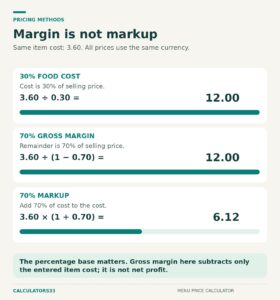
70% gross margin

and:

70% markup

produce very different selling prices because they use different denominators.

Select the target that matches the pricing method you actually intend to use.

Understand Food Cost Percentage, Gross Margin, and Markup

Suppose an item costs:

$4.80

and sells for:

$16.00

Food Cost Percentage

Food cost % = Cost ÷ Selling price × 100

$4.80 ÷ $16.00 × 100 = 30%

Gross Margin After Entered Cost

Gross margin % = (Selling price − Cost) ÷ Selling price × 100

($16.00 − $4.80) ÷ $16.00 × 100 = 70%

Markup on Cost

Markup % = (Selling price − Cost) ÷ Cost × 100

($16.00 − $4.80) ÷ $4.80 × 100 = 233.33%

The cost and selling price remain exactly the same.

Only the way their relationship is expressed changes.

When the same entered cost is used:

Gross margin % = 100% − Food cost %

Therefore, a:

30% food cost

corresponds to a:

70% gross margin after that cost

Equivalent markup can be calculated as:

Markup % = Gross margin % ÷ Food cost % × 100

For the same example:

70 ÷ 30 × 100 = 233.33%

This makes it possible to translate the same price-and-cost relationship between food cost, margin, and markup without treating those terms as interchangeable.

Calculate Menu Price From a Food Cost Percentage

When pricing from a target food cost percentage:

Menu price = Cost ÷ Target food cost rate

The percentage must be converted to decimal form.

For example:

30% = 0.30

With a $4.80 item cost:

$4.80 ÷ 0.30 = $16.00

The calculated menu price is:

$16.00

If you already have a selling price and instead want to calculate its actual food cost percentage, use the Food Cost Percentage Calculator.

Calculate Menu Price From a Target Gross Margin

For a target gross margin after the entered cost:

Menu price = Cost ÷ (1 − Target margin rate)

Suppose:

  • Cost: $4.80
  • Target gross margin: 70%

Convert 70% to:

0.70

Then:

$4.80 ÷ (1 − 0.70)

$4.80 ÷ 0.30 = $16.00

A 70% gross-margin target therefore produces the same $16.00 price as a 30% food-cost target when both use the same cost basis.

That equivalence exists because:

70% + 30% = 100%

Calculate Menu Price From Markup on Cost

For markup:

Menu price = Cost × (1 + Markup rate)

Suppose:

  • Cost: $4.80
  • Markup: 100%

Convert 100% to:

1.00

Then:

$4.80 × (1 + 1.00) = $9.60

The selling price is:

$9.60

At that price:

Food cost:

$4.80 ÷ $9.60 × 100 = 50%

Gross margin:

($9.60 − $4.80) ÷ $9.60 × 100 = 50%

Markup:

($9.60 − $4.80) ÷ $4.80 × 100 = 100%

A 100% markup therefore corresponds to a 50% gross margin, not a 100% margin.

Calculate Cost Per Serving From a Recipe Batch

If you already know the cost of one saleable item or serving, enter that cost directly.

If you only know the total cost of a recipe batch, first calculate:

Cost per serving = Recipe batch cost ÷ Saleable yield

Suppose:

  • Recipe batch cost: $42.50
  • Saleable yield: 10 portions

Then:

$42.50 ÷ 10 = $4.25

The pricing cost becomes:

$4.25 per serving

Use a realistic saleable yield rather than a larger theoretical yield that is not normally achieved.

If the batch consistently produces only 10 saleable portions, pricing it as though it produces 12 would understate the cost per serving.

See How Food Cost Targets Change the Required Price

Assume the entered item cost is:

$4.25

Different food-cost targets produce different selling prices.

Food cost target Equivalent gross margin Equivalent markup Calculated price
40% 60% 150.00% $10.625
35% 65% 185.71% $12.1429
30% 70% 233.33% $14.1667
25% 75% 300.00% $17.00
20% 80% 400.00% $21.25

For example, changing the food-cost target from:

30%

to:

25%

is a reduction of:

5 percentage points

But the corresponding unrounded menu price increases from:

$4.25 ÷ 0.30 = $14.1667

to:

$4.25 ÷ 0.25 = $17.00

Relative increase in required selling price:

($17.00 − $14.1667) ÷ $14.1667 × 100 ≈ 20%

The target percentage and menu price therefore do not move in a simple one-for-one relationship.

Keep the Unrounded Target Separate From the Displayed Price

A menu-price calculation may produce more decimal places than are normally displayed as currency.

Suppose the mathematical result is:

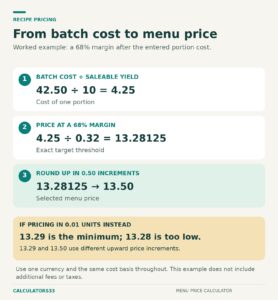
$13.28125

That is the unrounded target price.

Displayed to two decimal places, it becomes:

$13.28

Those figures are close but not identical.

This distinction matters when the calculated price represents the minimum amount required to satisfy a target.

A displayed price rounded to the nearest cent can sometimes sit fractionally below the full-precision mathematical threshold.

For that reason, any optional upward pricing increment should be applied to the unrounded result, not to a previously rounded display value.

Round the Menu Price Upward to a Practical Increment

A mathematically calculated result may not match the price increments you want to use on a menu.

Suppose:

Unrounded target price = $13.28125

and the selected upward increment is:

$0.50

The next valid $0.50 increment at or above the mathematical target is:

$13.50

The calculator treats the target result as a floor and rounds upward.

This differs from ordinary nearest-value rounding, which could move the selling price downward.

After the price is rounded, the calculator recalculates:

  • food cost percentage;
  • gross margin after entered cost;
  • markup on cost.

The final rounded menu price can therefore be evaluated using its actual cost relationships rather than assuming it still matches the original target exactly.

Complete Example: Recipe Cost to Rounded Menu Price

Suppose:

  • Recipe batch cost: $42.50
  • Saleable yield: 10 portions
  • Target gross margin: 68%
  • Upward rounding increment: $0.50
  • Current menu price: $12.50

Step 1: Calculate Cost Per Serving

$42.50 ÷ 10 = $4.25

Pricing cost:

$4.25 per serving

Step 2: Calculate the Exact Target Price

A 68% gross margin means the entered cost represents:

100% − 68% = 32%

of the selling price.

Therefore:

$4.25 ÷ 0.32 = $13.28125

Unrounded target:

$13.28125

Displayed to cents:

$13.28

Step 3: Apply Upward Price Rounding

The next $0.50 increment at or above $13.28125 is:

$13.50

Rounded menu price:

$13.50

Step 4: Recalculate the Pricing Metrics at $13.50

Food cost percentage:

$4.25 ÷ $13.50 × 100 ≈ 31.48%

Gross margin:

($13.50 − $4.25) ÷ $13.50 × 100 ≈ 68.52%

Markup:

($13.50 − $4.25) ÷ $4.25 × 100 ≈ 217.65%

The selected gross-margin target was:

68%

After upward rounding, the actual gross margin becomes approximately:

68.52%

The final price therefore exceeds the minimum mathematical target slightly.

Step 5: Compare With the Current Menu Price

Current price:

$12.50

Rounded target price:

$13.50

Price difference:

$13.50 − $12.50 = $1.00

At the current $12.50 price:

Food cost percentage:

$4.25 ÷ $12.50 × 100 = 34%

Gross margin:

($12.50 − $4.25) ÷ $12.50 × 100 = 66%

The comparison therefore shows:

Metric Current price Rounded target price
Selling price $12.50 $13.50
Food cost 34.00% 31.48%
Gross margin after cost 66.00% 68.52%
Price difference +$1.00

This gives the dollar price difference useful cost-based context.

Interpret the Current-Price Comparison Correctly

The calculator compares the current menu price with the selected mathematical target.

Comparison Meaning under the entered cost and target
Target price is above current price Current price does not meet the selected cost-based threshold
Target price matches current price Current price aligns with the selected target at the relevant precision
Target price is below current price Current price already meets or exceeds the selected target

A target price below the current selling price is not automatically a recommendation to reduce the price.

It means only that the existing price already satisfies the selected cost-based threshold.

Other pricing considerations may support retaining the higher price.

Compare Percentages With Dollars Remaining After Cost

Two menu items can have the same food-cost percentage but leave very different dollar amounts after the entered cost.

For one item:

Dollars remaining after entered cost = Selling price − Item cost

Consider:

Item Cost Selling price Food cost Dollars remaining after entered cost
Item A $3.00 $10.00 30% $7.00
Item B $9.00 $30.00 30% $21.00

Both items have:

30% food cost

But:

Item A leaves $7.00

while:

Item B leaves $21.00

after the entered item cost.

Food cost percentage answers:

What share of the selling price is consumed by this cost?

The dollar remainder answers:

How many dollars remain after this cost is deducted?

Looking at both prevents two items with identical percentages from appearing economically identical when their price levels are very different.

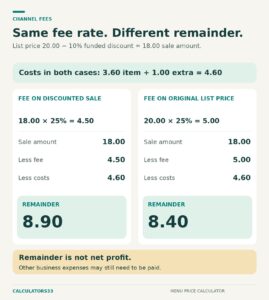
Dollars Remaining After Cost Are Not Net Profit

The calculator subtracts the entered item or recipe cost from the selling price.

If that entered amount represents ingredient or food cost only:

Selling price − Food cost

is not the same as net business profit.

Other restaurant costs can include items such as:

  • labor;
  • occupancy;
  • utilities;
  • payment processing;
  • packaging;
  • waste;
  • insurance;
  • taxes;
  • maintenance;
  • other operating expenses.

The calculator does not attempt to allocate all of those costs to an individual menu item.

Johnson & Wales University’s menu-pricing guidance likewise distinguishes food-cost and gross-margin calculations while noting that menu pricing is only one part of restaurant economics.

Use the result as a cost-based pricing benchmark, not as a complete profitability calculation.

Avoid Common Menu Pricing Errors

Treating Margin and Markup as the Same Percentage

A 70% margin and 70% markup do not produce the same selling price.

Always select the intended denominator.

Using the Wrong Cost Basis

The entered cost should describe the item or serving being priced.

Do not divide a complete recipe batch cost by a single-serving price without first converting the batch into cost per saleable serving.

Using Theoretical Yield Instead of Saleable Yield

If a recipe theoretically produces 12 portions but only 10 are normally saleable, using 12 understates the cost per serving.

Rounding Before Applying the Pricing Increment

Apply upward increment rounding to the full-precision target result.

Do not first round the target to cents and then use that rounded display value as though it were exact.

Assuming the Original Target Still Applies After Rounding

Once the selling price changes, recalculate food cost, margin, and markup from the final rounded price.

Treating the Result as Guaranteed Profit

The calculator prices against the cost entered.

It does not automatically include every operating cost of the business.

Use Consistent Pricing Inputs

For a meaningful calculation:

  • item or serving cost must be greater than zero;
  • recipe yield must be greater than zero when batch costing is used;
  • food-cost target must be greater than 0%;
  • gross-margin target must be below 100%;
  • markup must be entered using the intended percentage basis;
  • current price should refer to the same saleable item;
  • rounding increment must be positive when used.

Recalculate when:

  • ingredient costs change;
  • recipe yield changes;
  • portion size changes;
  • the pricing target changes;
  • the menu-price increment changes;
  • the current selling price changes.

A pricing calculation is only as current as the cost basis entered.

Calculation Method

The Menu Price Calculator starts with either:

  • direct item or serving cost; or
  • recipe batch cost divided by saleable yield.

It then calculates the selling-price benchmark according to the selected method.

For food cost percentage:

Menu price = Cost ÷ Food cost rate

For gross margin:

Menu price = Cost ÷ (1 − Margin rate)

For markup:

Menu price = Cost × (1 + Markup rate)

When rounding is enabled, it applies the selected upward increment to the full-precision target price.

It then recalculates the effective:

  • food cost percentage;
  • gross margin after the entered cost;
  • markup on cost.

When a current selling price is supplied, the calculator also compares that price with the calculated target and shows the cost-based percentages at the current price.

The result is a transparent mathematical pricing benchmark based on the cost and target entered.

It does not determine demand, competitive positioning, customer willingness to pay, or complete business profitability.